
3 Simple Steps to Lock Down Your Google Workspace
Protect your business in 30 minutes—even if you're not tech-savvy
Cybersecurity sounds complicated, but protecting your business doesn't have to be. Google Workspace includes powerful safety features that take just minutes to turn on. Here's how to dramatically improve your security without needing a computer science degree.
The Good News: You've Already Started
If you've turned on these features, you're already ahead of most businesses:
Safe Browsing
Like having a security guard check every website before you visit it. If a site looks dangerous, you'll get a warning before anything bad happens.
Email Attachment Testing
Works like a bomb squad for your inbox. Every file someone sends you gets checked in a safe, isolated space before it reaches you.
Link Protection in Emails
Scans every link in your emails and warns you if clicking it could be dangerous. Think of it as a food taster for your emails.
Data Protection
Acts like a bouncer at a club, stopping your employees from accidentally sharing sensitive information like credit card numbers with people outside your company.
The Three Things You Need to Fix Right Now
Even with those protections turned on, most businesses still have three big security holes. The good news? You can fix all three in about 30 minutes. Here's what to do:
1. Check Every Phone and Tablet That Connects to Your Email
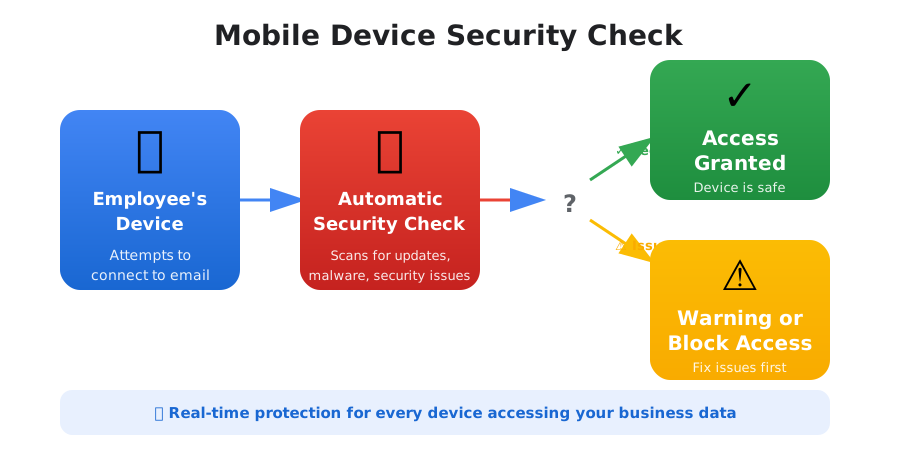
What's the problem?
When your employees check work email on their phones, those phones become doors into your business. If someone's phone hasn't been updated in months or has security problems, hackers can use it to break in.
The simple fix:
Turn on a feature that automatically checks every phone or tablet before it can access your work email. If there's a problem, the person gets a warning explaining how to fix it. You can even block phones with serious security issues from connecting at all.
How much safer you'll be: Much safer
Think of this like a security checkpoint. You wouldn't let just anyone walk into your office—why let any device connect to your work systems?
2. Make Everyone Use Better Passwords (or Get Rid of Passwords Entirely)
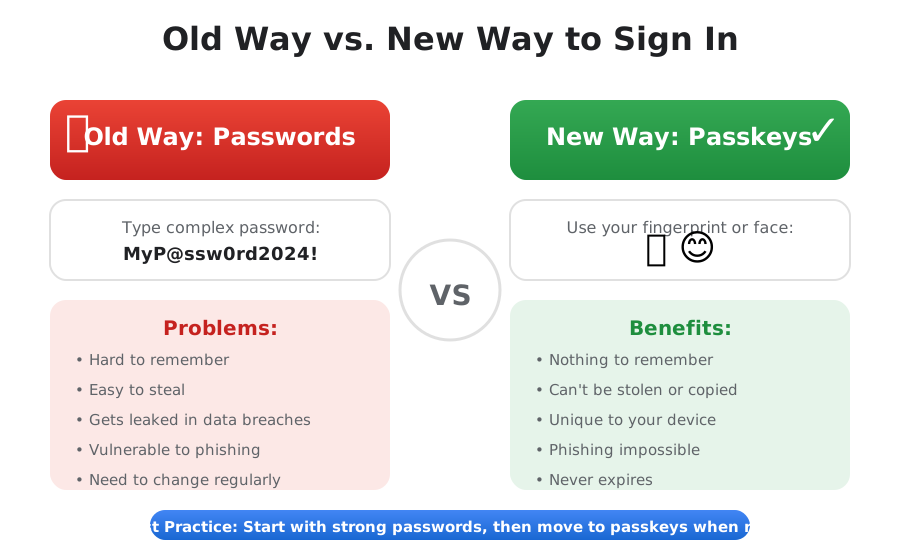
What's happening right now:
Weak passwords like “Password123” or “Summer2024&rquot; are why hackers keep breaking into accounts. If you're seeing suspicious login attempts, weak passwords are probably the reason.
What you need to know:
Google has figured out something better than passwords called "passkeys." Instead of typing a password, you can sign in using your fingerprint, face, or a PIN on your phone. It's impossible for hackers to steal, and it's actually easier for your team to use.
What to do:
- Require everyone to create strong passwords (Google will tell you what counts as strong)
- Let people use passkeys instead of passwords when they're ready
- Send your team simple instructions on how to set this up
How much safer you'll be: Significantly safer
Using a passkey is like using your house key instead of hiding a key under the doormat. Nobody can copy it, and it only works for you.
3. Require Two-Step Sign-In for Everyone
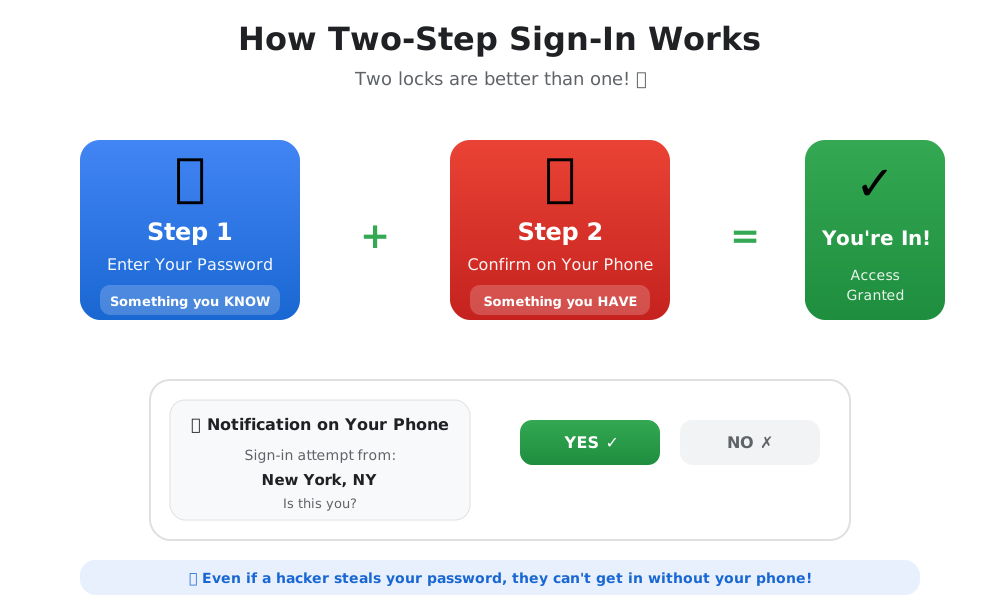
Here's a fact:
Adding two-step sign-in cuts account hacking in half. If you have employees without it (and most businesses do), you're making it way too easy for hackers.
What is two-step sign-in?
It's like having two locks on your door instead of one. First, you enter your password (something you know). Then you prove it's really you by using your phone or another device (something you have). Even if a hacker steals your password, they can't get in without that second step.
How it works:
After typing their password, your employee gets a quick notification on their phone saying "Is this you trying to sign in?" They tap "Yes," and they're in. It adds about 3 seconds to signing in but makes your accounts 50% harder to hack.
How to do it:
- Find out which employees don't have two-step sign-in set up yet
- Send everyone a message explaining why this matters and when it needs to be done
- Include simple setup instructions (Google provides great step-by-step guides)
- Give people a week or two to get it set up
- Turn on the requirement so everyone must use it
How much safer you'll be: This is the most important one
Why This Actually Matters for Your Business
Here's what happens when you make these three changes:
💰 You'll avoid expensive problems
Dealing with a hacker breaking in costs tens of thousands of dollars (or more). Preventing it costs 30 minutes of your time.
📋 Your cyber insurance will be cheaper
Many insurance companies now require these basic protections. Without them, you might not be covered if something happens.
😴 You'll sleep better
Knowing your business has strong security in place means fewer middle-of-the-night worries about data breaches.
👍 Your team will actually like it
Modern security features like passkeys and quick phone notifications are easier to use than remembering complex passwords.
Your 30-Minute Action Plan
You can set up all three protections in one sitting. Here's how to spend your half hour:
Minutes 1-5:
Turn on phone and tablet checking
Minutes 6-15:
Set up strong password requirements and enable passkeys
Minutes 16-30:
Configure two-step sign-in and draft an email to your team
Remember: The setup itself is quick. The harder part is explaining it to your team. When you send out your announcement, make sure to include why you're making these changes, exactly what they need to do, when it needs to be done by, and who they can ask if they get stuck.
What Comes Next
Security isn't something you set up once and forget about. After you've got these three basics in place, here are some good habits to develop:
Check your security dashboard once a month
Google will tell you if there are new problems to fix or features to turn on.
Train your team on basic security
A 15-minute conversation about spotting phishing emails can prevent major problems.
Keep improving
As your business grows and changes, your security needs will too.
Need a Hand With This?
These changes are designed to be simple, but we understand that "simple" is relative. If you'd rather have an expert handle the setup and explain everything to your team, that's what we do.
At Iron Cove Solutions, we help businesses like yours implement Google Workspace security without the headaches. We'll handle the technical setup, create simple instructions for your team, and make sure everything works smoothly—so you can focus on running your business instead of worrying about hackers.
Get a Free Security ConsultationReady to lock down your Google Workspace?
These three changes take 30 minutes but protect your business for years to come. Don't wait until after someone breaks in—fix these gaps today.